Project
KeePass Backup and File Rotation
Hourly versioned backups of an encrypted KeePass database from Dropbox to Google Drive, keeping the ten most recent archives.
Overview
The client’s primary encrypted KeePass database lived in Dropbox and relied on sync alone. Backups were copied by hand, there was no versioning or retention control, and old copies piled up without structure: a real risk of losing critical password data. The goal was a fully automated workflow that notices changes, keeps versioned copies off-site and cleans up after itself.
How the workflow runs
- Every hour a scheduler checks the database file in Dropbox and computes its hash.
- The hash is compared with the last known value stored in Google Sheets; if nothing changed, the run stops there.
- If the file changed, it is packed into a timestamped archive and uploaded to a dedicated backup folder in Google Drive, and the stored hash is updated.
- The workflow then lists the backup folder and, when there are more than ten archives, deletes the oldest ones.
Results
- Continuous monitoring of the database, with a backup created right after each change.
- Redundant storage across Dropbox and Google Drive, with version history.
- Automatic rotation keeps storage tidy; no manual work at all.
Workflows

Hash check, archive and upload, then rotation of old backups
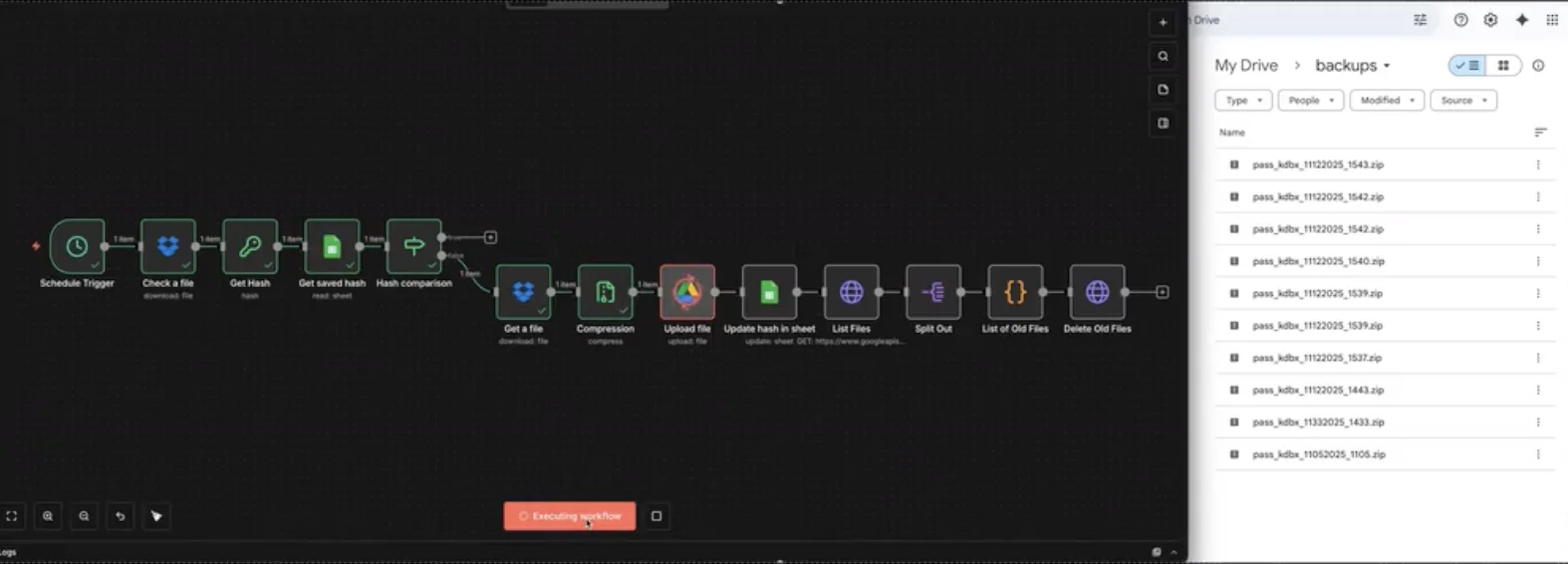
A run in progress next to the Google Drive backup folder with timestamped archives
Facts
- Type
- Client project · n8n automation
- Role
- n8n automation developer
- Published
- December 2025
- Stack
- n8n, Dropbox API, Google Drive API, Google Sheets
Links